จัดการ Workspaces
Workspaces in NativeRest allow you to group requests by specific domain. The workspace can also be called a project.
[พื้นที่ทำงานใน Nativerest ช่วยให้คุณสามารถจัดกลุ่มคำขอตามโดเมนเฉพาะ พื้นที่ทำงานสามารถเรียกได้ว่าเป็นโครงการ]
With a NativeRest application you can create various types of workspaces:
[ด้วยแอปพลิเคชั่น Nativerest คุณสามารถสร้างพื้นที่ทำงานประเภทต่างๆ:]
- Local The data is stored only on your PC. You will have access to them even without the Internet.
[ในเครื่องข้อมูลจะถูกเก็บไว้บนพีซีของคุณเท่านั้น คุณจะสามารถเข้าถึงพวกเขาได้แม้จะไม่มีอินเทอร์เน็ตก็ตาม] - Cloud The data is stored on this PC and synchronized with NativeRest Cloud in the background. Such workspaces can be restored if you use NativeRest on another PC, or of you change your PC.
[คลาวด์ข้อมูลจะถูกเก็บไว้บนพีซีนี้และซิงโครไนซ์กับคลาวด์ Nativerest ในพื้นหลัง พื้นที่ทำงานดังกล่าวสามารถกู้คืนได้หากคุณใช้ Nativerest บนพีซีเครื่องอื่นหรือเปลี่ยนพีซีของคุณ} - Team cloud The data is stored similarly to the cloud workspace. In addition, your team members will have access to such workspace. You can manage your team in the web version of your account.
[Team Cloud ข้อมูลจะถูกเก็บไว้ในทำนองเดียวกันกับ Workspace Cloud นอกจากนี้สมาชิกในทีมของคุณจะสามารถเข้าถึงพื้นที่ทำงานดังกล่าว คุณสามารถจัดการทีมของคุณในเวอร์ชันเว็บของบัญชีของคุณ]
All operations on synchronization with Cloud (and Team cloud) workspaces are performed in the background and do not lead to freezing of the main thread of the NativeRest application.
[การดำเนินการทั้งหมดเกี่ยวกับการซิงโครไนซ์กับพื้นที่ทำงานของคลาวด์ (และทีมคลาวด์) จะดำเนินการในพื้นหลังและไม่นำไปสู่การแช่แข็งของหัวข้อหลักของแอปพลิเคชัน Nativerest]
Create a new workspace สร้างพื้นที่ทำงานใหม่
To create a new workspace, click Workspaces on the bottom bar or Ctrl + W, then click Plus button.
ในการสร้างพื้นที่ทำงานใหม่ให้คลิกพื้นที่ทำงานที่แถบด้านล่างหรือ Ctrl + W จากนั้นคลิกปุ่ม Plus]
Enter a Name and select Storage for your workspace.
[ป้อนชื่อและเลือกที่เก็บข้อมูลสำหรับพื้นที่ทำงานของคุณ]
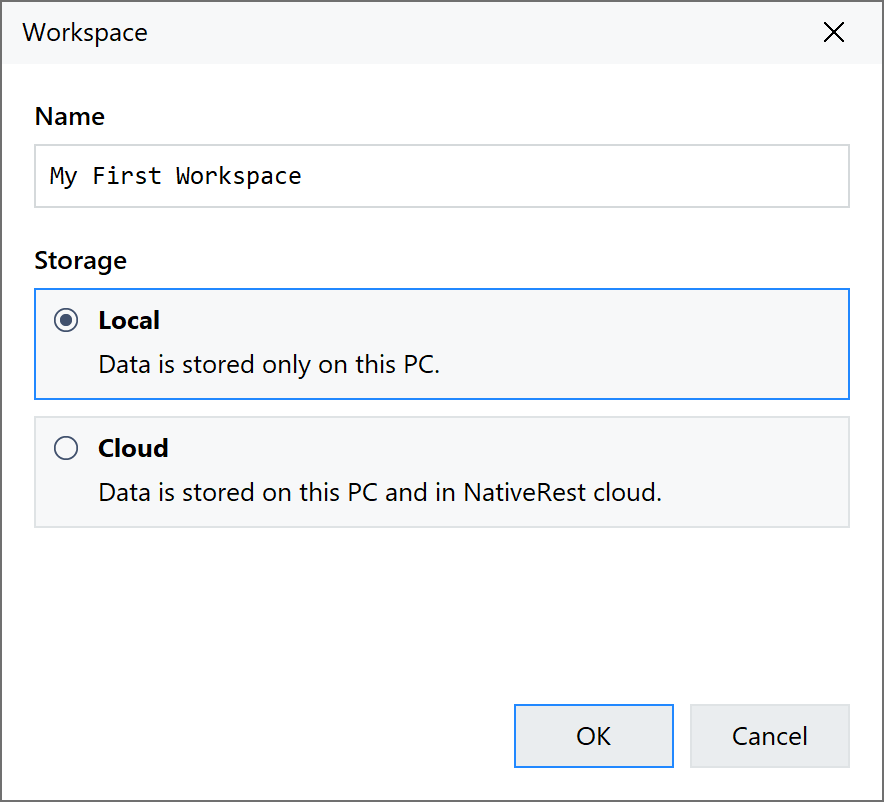
You can check the Go to new workspace box to open this workspace after creation.
[คุณสามารถตรวจสอบไปที่กล่องเวิร์กสเปซใหม่เพื่อเปิดพื้นที่ทำงานนี้หลังจากสร้าง]
You can also change the storage type after the workspace has been created. Please note that converting a local workspace to a Cloud/Team may take some time as it copies requests to the NativeRest Cloud.
[นอกจากนี้คุณยังสามารถเปลี่ยนประเภทที่เก็บข้อมูลหลังจากสร้างพื้นที่ทำงานแล้ว โปรดทราบว่าการแปลงพื้นที่ทำงานในพื้นที่เป็นคลาวด์/ทีมอาจใช้เวลาสักครู่เนื่องจากมีการคัดลอกคำขอไปยังคลาวด์ Nativerest ]