Cookie Management
NativeRest's cookie manager enables you to view and edit cookies that are associated with different domains. You can manually create cookies for a domain or automatically receive them when sending requests to domains.
[Cookie Manager ของ Nativerest ช่วยให้คุณสามารถดูและแก้ไขคุกกี้ที่เกี่ยวข้องกับโดเมนที่แตกต่างกัน คุณสามารถสร้างคุกกี้ด้วยตนเองสำหรับโดเมนหรือรับโดยอัตโนมัติเมื่อส่งคำขอไปยังโดเมน]
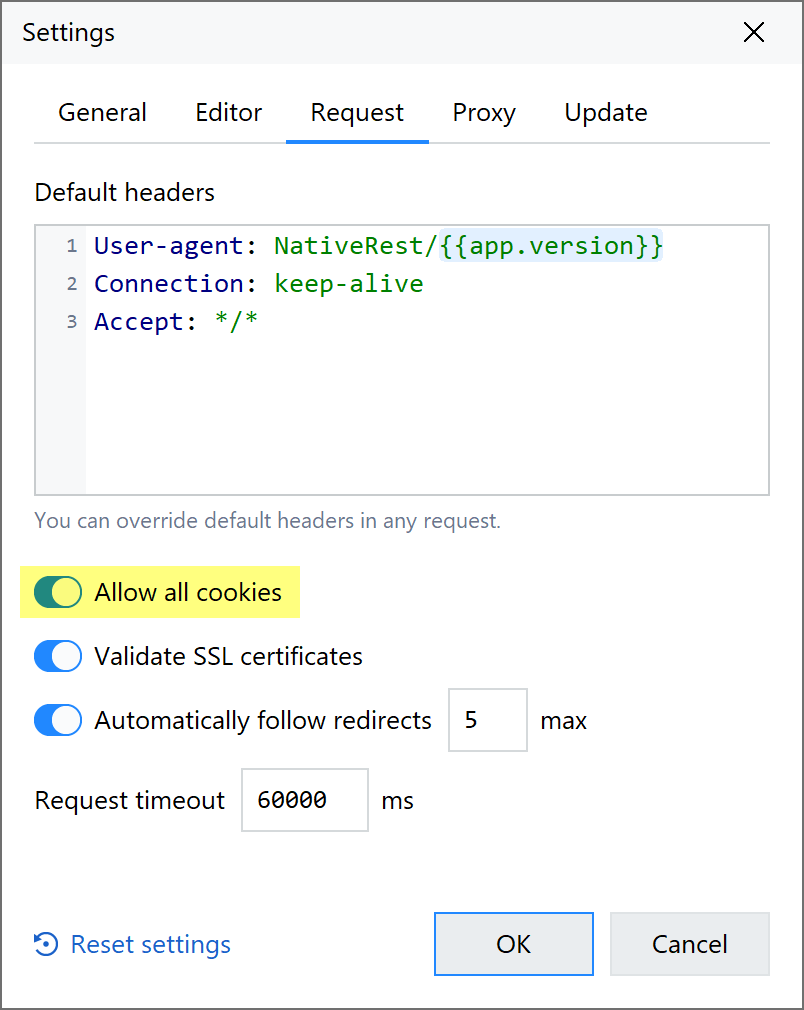
By default, NativeRest has cookies enabled. You can disable them in the settings on the Request tab.
[โดยค่าเริ่มต้น Nativerest เปิดใช้งานคุกกี้ คุณสามารถปิดการใช้งานได้ในการตั้งค่าบนแท็บคำขอ]
What are cookies? คุกกี้คืออะไร?
A computer cookie is more formally known as an HTTP cookie, a web cookie, an Internet cookie, or a browser cookie. The name is a shorter version of "magic cookie," which is a term for a packet of data that a computer receives and then sends back without changing or altering it.
[คุกกี้คอมพิวเตอร์เป็นที่รู้จักอย่างเป็นทางการมากขึ้นว่าเป็นคุกกี้ HTTP, คุกกี้เว็บ, คุกกี้อินเทอร์เน็ตหรือคุกกี้เบราว์เซอร์ ชื่อเป็นเวอร์ชันที่สั้นกว่าของ "Magic Cookie" ซึ่งเป็นคำศัพท์สำหรับแพ็คเก็ตของข้อมูลที่คอมพิวเตอร์ได้รับจากนั้นส่งกลับโดยไม่ต้องเปลี่ยนหรือเปลี่ยนแปลง]
A cookie typically has two pieces of data: a unique ID for each user and a site name. Cookies enable websites to retrieve this information when you revisit them, so that they can remember you and your preferences and tailor page content for you based on this information. Without cookies, you’d have to sign in again after you leave a site or rebuild your shopping cart if you closed a web page. This makes cookies an important part of the internet experience.
[โดยทั่วไปแล้วคุกกี้จะมีข้อมูลสองชิ้น: ID ที่ไม่ซ้ำกันสำหรับผู้ใช้แต่ละคนและชื่อไซต์ คุกกี้ช่วยให้เว็บไซต์สามารถดึงข้อมูลนี้ได้เมื่อคุณกลับมาอีกครั้งเพื่อให้พวกเขาสามารถจดจำคุณและเนื้อหาของหน้าเว็บและปรับแต่งเนื้อหาสำหรับคุณตามข้อมูลนี้ หากไม่มีคุกกี้คุณจะต้องลงชื่อเข้าใช้อีกครั้งหลังจากออกจากไซต์หรือสร้างตะกร้าสินค้าของคุณใหม่หากคุณปิดหน้าเว็บ สิ่งนี้ทำให้คุกกี้เป็นส่วนสำคัญของประสบการณ์ทางอินเทอร์เน็ต]
Manage Cookies จัดการคุกกี้
To manage cookies in NativeRest, open a request, then select Cookies panel.
[ในการจัดการคุกกี้ใน Nativerest ให้เปิดคำขอจากนั้นเลือกแผงคุกกี้]
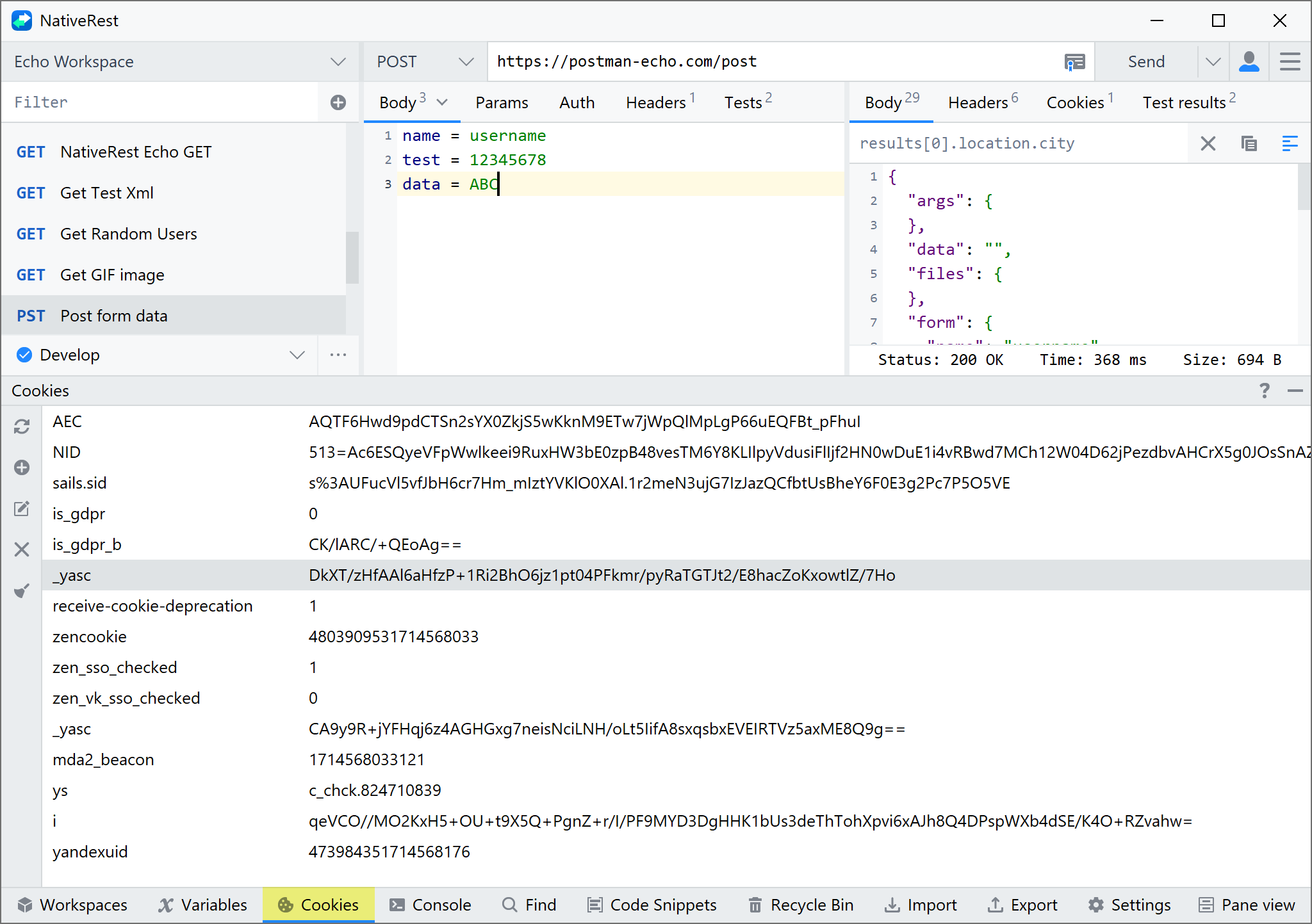
The Cookies panel displays a list of domains and the cookies associated with each one. If you want to view cookies for a domain that isn't present in the list, you can add a domain.แผงคุกกี้แสดงรายการโดเมนและคุกกี้ที่เกี่ยวข้องกับแต่ละรายการ หากคุณต้องการดูคุกกี้สำหรับโดเมนที่ไม่มีอยู่ในรายการคุณสามารถเพิ่มโดเมนได้
Creating cookies การสร้างคุกกี้
To add a new cookie for a domain, select + Add Cookie. NativeRest supports the following attributes:
[หากต้องการเพิ่มคุกกี้ใหม่สำหรับโดเมนให้เลือก + เพิ่มคุกกี้ Nativerest รองรับคุณลักษณะต่อไปนี้:]
- Name, Value – The name of the cookie and the value stored in it. [ชื่อค่า - ชื่อของคุกกี้และค่าที่เก็บไว้ในนั้น]
- Domain – The domain NativeRest will send the cookie to. [โดเมน - โดเมน nativerest จะส่งคุกกี้ไป]
- Path – The URL path that the cookie is restricted to. If the path is /, the cookie will be sent to all requests in the specified domain. [เส้นทาง - เส้นทาง URL ที่คุกกี้ถูก จำกัด หากเส้นทางคือ /คุกกี้จะถูกส่งไปยังคำขอทั้งหมดในโดเมนที่ระบุ]
- Expires – The time after which the cookie will expire and not be sent by NativeRest. Date example: Mon, 28 Oct 2024 15:53:19 GMT.
[หมดอายุ - เวลาหลังจากที่คุกกี้จะหมดอายุและไม่ถูกส่งโดย Nativerest ตัวอย่างวันที่: วันจันทร์, 28 ต.ค. 2024 15:53:19 GMT] - HttpOnly – If present, the cookie won't be accessible to the client-side scripts run on the page.
[httponly-ถ้ามีอยู่คุกกี้จะไม่สามารถเข้าถึงสคริปต์ฝั่งไคลเอ็นต์ที่ทำงานบนหน้า] - Secure – If present, the cookie is only sent when the URL begins with https:// and won't be sent over an insecure connection.
[ปลอดภัย - หากมีอยู่คุกกี้จะถูกส่งเฉพาะเมื่อ URL เริ่มต้นด้วย https: // และจะไม่ถูกส่งผ่านการเชื่อมต่อที่ไม่ปลอดภัย]
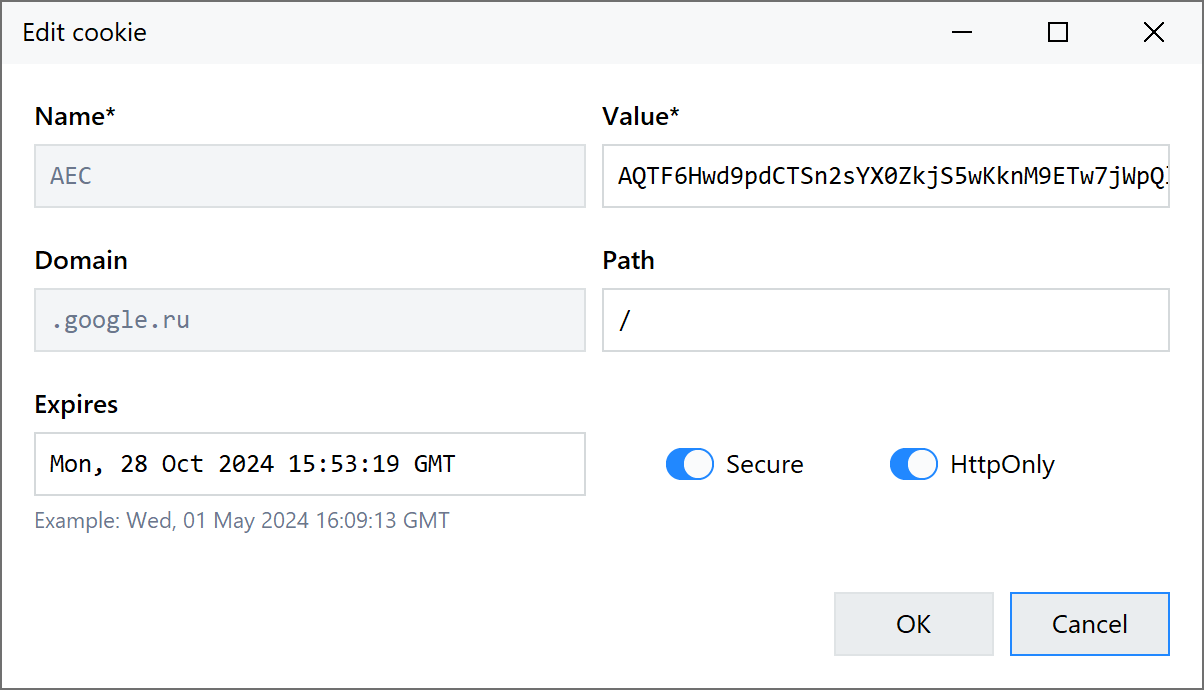
Select OK to save the cookie to the cookie store under the relevant domain.
[เลือกตกลงเพื่อบันทึกคุกกี้ลงในร้านคุกกี้ภายใต้โดเมนที่เกี่ยวข้อง]
Updating a cookie อัปเดตคุกกี้
To update an existing cookie, select the cookie you want to edit. You can edit any property except name and domain, and click OK to update.
[หากต้องการอัปเดตคุกกี้ที่มีอยู่ให้เลือกคุกกี้ที่คุณต้องการแก้ไข คุณสามารถแก้ไขคุณสมบัติใด ๆ ยกเว้นชื่อและโดเมนและคลิกตกลงเพื่ออัปเดต]
Deleting a cookie การลบคุกกี้
To delete an individual cookie, select "Close" icon in the left toolbar or press the Del key.
[ในการลบคุกกี้แต่ละตัวเลือกไอคอน "ปิด" ในแถบเครื่องมือด้านซ้ายหรือกดปุ่ม DEL]
Clear all cookies ล้างคุกกี้ทั้งหมด
To remove all cookies and domains from the cookie jar, select Clear.
[หากต้องการลบคุกกี้และโดเมนทั้งหมดออกจากขวดคุกกี้ให้เลือก Clear]