Environment Variables
Variables enable you to store and reuse values in NativeRest. By storing a value as a variable, you can reference it throughout a request body, headers, tests, and query params.
[ตัวแปรช่วยให้คุณสามารถจัดเก็บและนำค่ากลับมาใช้ใหม่ใน Nativerest ด้วยการจัดเก็บค่าเป็นตัวแปรคุณสามารถอ้างอิงได้ตลอดทั้งตัวคำขอส่วนหัวการทดสอบและพารามิเตอร์แบบสอบถาม]
A variable is a symbolic representation of data that enables you to access a value without having to enter it manually wherever you need it. This can be useful if you are using the same values in multiple places. Variables make your requests more flexible and readable, by abstracting the detail away.
[ตัวแปรคือการแสดงเป็นสัญลักษณ์ของข้อมูลที่ช่วยให้คุณสามารถเข้าถึงค่าโดยไม่ต้องป้อนด้วยตนเองไม่ว่าคุณจะต้องการ สิ่งนี้จะมีประโยชน์หากคุณใช้ค่าเดียวกันในหลาย ๆ ที่ ตัวแปรทำให้คำขอของคุณมีความยืดหยุ่นและอ่านง่ายขึ้นโดยการสรุปรายละเอียด]
For example, if you have the same URL in more than one request, but the URL might change later, you can store the URL in a variable host and reference it in your requests using {{host}}. If the URL changes, you can change the variable value and it will be reflected throughout your requests, wherever you've used the variable name.
[ตัวอย่างเช่นหากคุณมี URL เดียวกันในคำขอมากกว่าหนึ่งคำขอ แต่ URL อาจเปลี่ยนแปลงในภายหลังคุณสามารถจัดเก็บ URL ในโฮสต์ตัวแปรและอ้างอิงในคำขอของคุณโดยใช้ {{host}} หาก URL เปลี่ยนแปลงคุณสามารถเปลี่ยนค่าตัวแปรและจะสะท้อนให้เห็นตลอดคำขอของคุณไม่ว่าคุณจะใช้ชื่อตัวแปรใด]
The same principle applies to any part of your request where data is repeated. Whatever value is stored in the variable will be included wherever you've referenced the variable when your requests run. If the base URL value is https://nativerest.net/echo, and is listed as part of the request URL using {{host}}/get, NativeRest will send the request to https://nativerest.net/echo/get.
[หลักการเดียวกันนี้ใช้กับส่วนใดส่วนหนึ่งของคำขอของคุณที่ข้อมูลซ้ำ ไม่ว่าค่าใดจะถูกเก็บไว้ในตัวแปรจะรวมอยู่ทุกที่ที่คุณอ้างอิงตัวแปรเมื่อคำขอของคุณทำงาน หากค่า URL พื้นฐานคือ https://nativerest.net/echo และมีการระบุไว้เป็นส่วนหนึ่งของ URL คำขอโดยใช้ {{host}}/รับ Nativerest จะส่งคำขอไปที่ https://nativerest.net/echo/get]
Click Variables on the main menu or use shortcut Ctrl + E to open the environment editor.
[คลิกตัวแปรบนเมนูหลักหรือใช้ทางลัด Ctrl + E เพื่อเปิดตัวแก้ไขสภาพแวดล้อม]
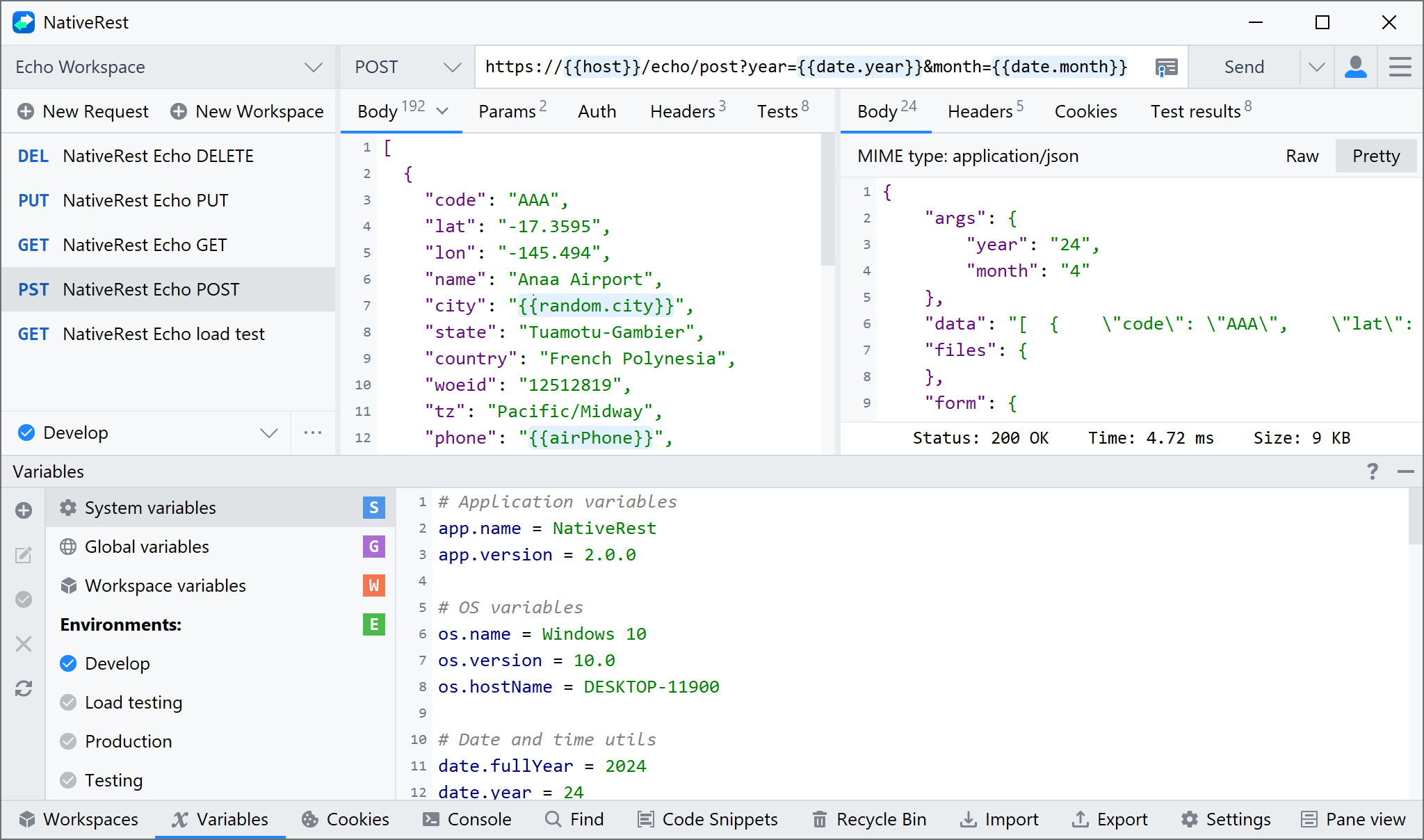
Variables in NativeRest are key-value pairs.
[ตัวแปรใน nativerest เป็นคู่คีย์-ค่า]
You can use symbol # at the beginning of a line to enter a comment.
[คุณสามารถใช้สัญลักษณ์ # ที่จุดเริ่มต้นของบรรทัดเพื่อป้อนความคิดเห็น]
Each variable name represents its key, so referencing the variable name enables you to access its value.
[ชื่อตัวแปรแต่ละตัวแสดงถึงคีย์ดังนั้นการอ้างอิงชื่อตัวแปรช่วยให้คุณสามารถเข้าถึงค่าได้]
# My first name myName = Antonio # My token myToken = ABCD0123Empty lines, comments, additional spaces are allowed. To format a list of variables using a shortcut Ctrl + Alt + L.
[บรรทัดที่ว่างเปล่าความคิดเห็นพื้นที่เพิ่มเติมได้รับอนุญาต ในการจัดรูปแบบรายการตัวแปรโดยใช้ทางลัด Ctrl + Alt + L]
Variable scopes
NativeRest supports variables at different scopes, allowing you to tailor your processing to a variety of development, testing, and collaboration tasks. Scopes in NativeRest relate to the different contexts that your requests run in, and different variable scopes are suited to different tasks.
[Nativerest รองรับตัวแปรในขอบเขตที่แตกต่างกันช่วยให้คุณสามารถปรับการประมวลผลของคุณให้เข้ากับการพัฒนาการทดสอบและงานการทำงานร่วมกันที่หลากหลาย ขอบเขตใน Nativerest เกี่ยวข้องกับบริบทที่แตกต่างกันที่คำขอของคุณทำงานและขอบเขตตัวแปรที่แตกต่างกันนั้นเหมาะสมกับงานที่แตกต่างกัน}
In order from broadest to narrowest, these scopes are: system, global, workspace, and environment.
[ตามลำดับจากกว้างที่สุดไปจนถึงแคบที่สุดขอบเขตเหล่านี้คือ: ระบบ, ทั่วโลก, พื้นที่ทำงานและสิ่งแวดล้อม]
- System variables enable you to generate sample data, including random names, addresses, email addresses, and much more. You can use these pre-defined variables multiple times to return different values per request.
[ตัวแปรระบบช่วยให้คุณสามารถสร้างข้อมูลตัวอย่างรวมถึงชื่อสุ่มที่อยู่ที่อยู่อีเมลและอื่น ๆ อีกมากมาย คุณสามารถใช้ตัวแปรที่กำหนดไว้ล่วงหน้าเหล่านี้หลายครั้งเพื่อส่งคืนค่าที่แตกต่างกันต่อคำขอ] - Global variables enable you to access data between collections, requests, scripts, and environments. Global variables are available throughout a workspace. Since global variables have the broadest scope available in NativeRest, they're well-suited for testing and prototyping. In later development phases, use more specific scopes.
[ตัวแปรทั่วโลกช่วยให้คุณสามารถเข้าถึงข้อมูลระหว่างคอลเลกชันคำขอสคริปต์และสภาพแวดล้อม ตัวแปรทั่วโลกมีให้บริการทั่วพื้นที่ทำงาน เนื่องจากตัวแปรทั่วโลกมีขอบเขตที่กว้างที่สุดใน Nativerest พวกเขาจะเหมาะสำหรับการทดสอบและการสร้างต้นแบบ ในขั้นตอนการพัฒนาในภายหลังให้ใช้ขอบเขตที่เฉพาะเจาะจงมากขึ้น] - Workspace variables are available throughout the requests in a workspace and are independent of environments. Workspace variables don't change based on the selected environment. Workspace variables are suitable if you're using a single environment, for example for auth or URL details.
[ตัวแปรเวิร์กสเปซมีให้บริการตลอดคำขอในพื้นที่ทำงานและเป็นอิสระจากสภาพแวดล้อม ตัวแปรพื้นที่ทำงานไม่เปลี่ยนแปลงตามสภาพแวดล้อมที่เลือก ตัวแปรเวิร์กสเปซมีความเหมาะสมหากคุณใช้สภาพแวดล้อมเดียวเช่นสำหรับรายละเอียดการรับรองความถูกต้องหรือ URL] - Environment variables enable you to scope your work to different environments, for example local development versus testing or production. One environment can be active at a time.
[ตัวแปรสภาพแวดล้อมช่วยให้คุณสามารถกำหนดขอบเขตการทำงานของคุณสู่สภาพแวดล้อมที่แตกต่างกันเช่นการพัฒนาในท้องถิ่นกับการทดสอบหรือการผลิต สภาพแวดล้อมหนึ่งสามารถใช้งานได้ในแต่ละครั้ง]

If a variable with the same name is declared in two different scopes, the value stored in the variable with narrowest scope will be used. For example, if there is a global variable named username and an environment variable named username, the local value will be used when the request runs.
[หากตัวแปรที่มีชื่อเดียวกันถูกประกาศในสองขอบเขตที่แตกต่างกันค่าที่เก็บไว้ในตัวแปรที่มีขอบเขตแคบที่สุดจะถูกใช้ ตัวอย่างเช่นหากมีตัวแปรทั่วโลกชื่อชื่อผู้ใช้และตัวแปรสภาพแวดล้อมชื่อชื่อผู้ใช้ค่าท้องถิ่นจะถูกใช้เมื่อคำขอทำงาน]
Set variables from a response
Starting from NativeRest 2.0.3 it has become possible to set variables from the response. Before setting a value to a variable, be sure to declare it. You can declare a variable in any scope: global, workspace and environment.
[เริ่มต้นจาก Nativerest 2.0.3 มันเป็นไปได้ที่จะตั้งค่าตัวแปรจากการตอบสนอง ก่อนที่จะตั้งค่าเป็นตัวแปรให้แน่ใจว่าได้ประกาศ คุณสามารถประกาศตัวแปรในขอบเขตใด ๆ : ทั่วโลกพื้นที่ทำงานและสภาพแวดล้อม]
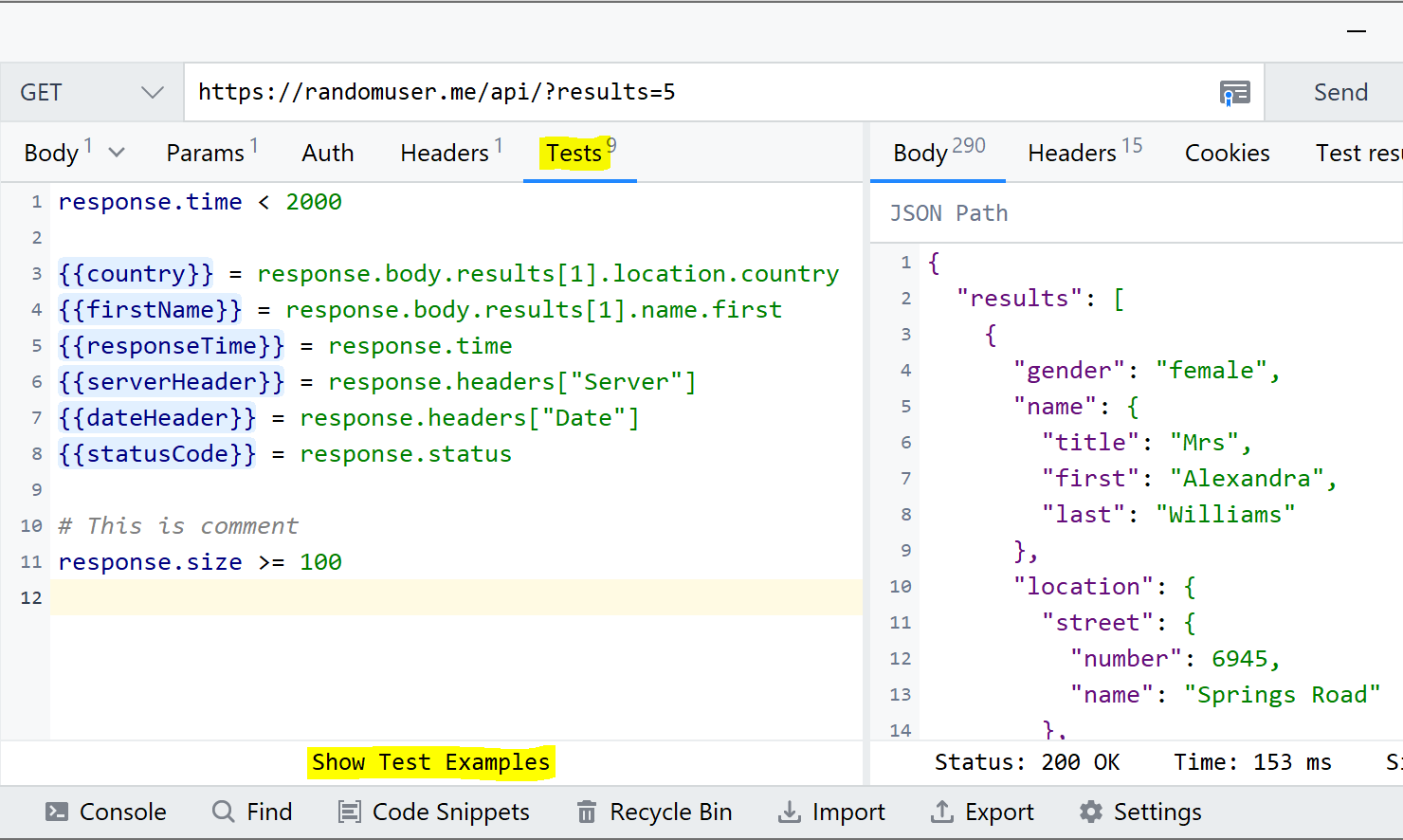
You can use JSON Path to extract the value from the response body. It is also possible to get the value from headers and cookies. Various examples:
[คุณสามารถใช้เส้นทาง JSON เพื่อแยกค่าออกจากร่างกายตอบสนอง นอกจากนี้ยังเป็นไปได้ที่จะได้รับคุณค่าจากส่วนหัวและคุกกี้ ตัวอย่างต่าง ๆ :]
{{country}} = response.body.users[1].location.country{{firstName}} = response.body.users[1].name.first{{myToken}} = response.body.token{{serverHeader}} = response.headers["Server"]{{dateHeader}} = response.headers["Date"]{{responseTime}} = response.time{{responseSize}} = response.size{{statusCode}} = response.statusUsing variables
You can use double curly braces to reference variables throughout NativeRest. For example, to reference a variable named username in your request authorization settings, you would use the following syntax with double curly braces around the name:
[คุณสามารถใช้เครื่องมือจัดฟันแบบหยิกคู่เพื่ออ้างอิงตัวแปรตลอด Nativerest ตัวอย่างเช่นในการอ้างอิงตัวแปรที่ชื่อชื่อผู้ใช้ในการตั้งค่าการอนุญาตคำขอของคุณคุณจะใช้ไวยากรณ์ต่อไปนี้พร้อมวงเล็บปีกกาสองเท่ารอบชื่อ:]
{{username}}When you run a request, NativeRest will resolve the variable and replace it with its current value. For example, you could have a request URL referencing a variable as follows:
[เมื่อคุณเรียกใช้คำขอ Nativerest จะแก้ไขตัวแปรและแทนที่ด้วยค่าปัจจุบัน ตัวอย่างเช่นคุณอาจมี URL คำขออ้างอิงตัวแปรดังนี้:]
https://nativerest.net/echo/get?customerId={{custId}}NativeRest will send whatever value you currently have stored for the custId variable when the request runs. If custId is currently 3, the request will be sent to the following URL including the query parameter:
[Nativerest จะส่งค่าใด ๆ ที่คุณจัดเก็บไว้สำหรับตัวแปร custid เมื่อคำขอทำงาน หาก custid เป็น 3 คำขอจะถูกส่งไปยัง URL ต่อไปนี้รวมถึงพารามิเตอร์การสืบค้น:]
https://nativerest.net/echo/get?customer_id=3If you are want to access a variable from within a request body, wrap its reference in double-quotes:
[หากคุณต้องการเข้าถึงตัวแปรจากภายในร่างกายคำขอให้ห่อข้อมูลอ้างอิงเป็นสองเท่า:]
{ "customerId": "{{custId}}" }You can use variables in request URLs, parameters, headers, authorization, body, and header presets.
[คุณสามารถใช้ตัวแปรใน URL ที่ร้องขอพารามิเตอร์ส่วนหัวการอนุญาตร่างกายและค่าที่ตั้งไว้ล่วงหน้า]
When you hover over a variable, NativeRest shows an overview of its current status. As you add variables to your requests, NativeRest prompts you with any that are currently defined.
[เมื่อคุณโฮเวอร์เหนือตัวแปร Nativerest จะแสดงภาพรวมของสถานะปัจจุบัน เมื่อคุณเพิ่มตัวแปรลงในคำขอของคุณ Nativerest จะแจ้งให้คุณทราบถึงสิ่งใดก็ตามที่กำหนดไว้ในปัจจุบัน]