การส่ง HTTP request
NativeRest is a native REST API client with which you can create and send API requests. Send HTTP requests with body, parameters and headers to the server. You don't need to enter commands in a terminal or write any code. Create a New request and select Send, and the API response appears right inside NativeRest.
[Nativerest เป็นไคลเอนต์ REST API ดั้งเดิมที่คุณสามารถสร้างและส่งคำขอ API ส่งคำขอ HTTP ด้วย Body พารามิเตอร์และส่วนหัวไปยังเซิร์ฟเวอร์ คุณไม่จำเป็นต้องป้อนคำสั่งในเทอร์มินัลหรือเขียนรหัสใด ๆ สร้างคำขอใหม่และเลือกส่งและการตอบกลับ API จะปรากฏขึ้นภายใน Nativerest]
API requests defined
APIs provide a structured way for one application to access the capabilities of another application. Typically, this communication happens over the internet by way of an API server. A client application (like a mobile app) sends a request to the server, and after the request processes the server returns a response to the client.
[API เป็นวิธีที่มีโครงสร้างสำหรับแอปพลิเคชันหนึ่งเพื่อเข้าถึงความสามารถของแอปพลิเคชันอื่น โดยทั่วไปการสื่อสารนี้เกิดขึ้นผ่านอินเทอร์เน็ตผ่านเซิร์ฟเวอร์ API แอปพลิเคชันไคลเอนต์ (เช่นแอพมือถือ) ส่งคำขอไปยังเซิร์ฟเวอร์และหลังจากคำขอประมวลผลเซิร์ฟเวอร์ส่งคืนการตอบกลับไปยังไคลเอนต์]
A request includes an HTTP request method and the URL of the API endpoint. The method indicates the action you want the API to perform. Here are some of the most common methods:
[คำขอรวมถึงวิธีการร้องขอ HTTP และ URL ของจุดสิ้นสุด API วิธีการระบุการกระทำที่คุณต้องการให้ API ดำเนินการ นี่คือวิธีการที่พบบ่อยที่สุด:]
- GET retrieves data from an API. [รับข้อมูลจาก API]
- POST sends new data to an API. [โพสต์ส่งข้อมูลใหม่ไปยัง API]
- PUT and PATCH update existing data. [อัปเดตข้อมูลที่มีอยู่]
- DELETE removes existing data. [ลบข้อมูลที่มีอยู่]
Make sure you've downloaded and installed the NativeRest desktop application. When you're ready, open the NativeRest desktop app and send your first API request.
[ตรวจสอบให้แน่ใจว่าคุณดาวน์โหลดและติดตั้งแอปพลิเคชันเดสก์ท็อป Nativerest เมื่อคุณพร้อมให้เปิดแอพเดสก์ท็อป Nativerest และส่งคำขอ API ครั้งแรกของคุณ]
Sending a request
1. When you're ready, open NativeRest and send your first HTTP request.1.
[เมื่อคุณพร้อมให้เปิด nativerest และส่งคำขอ HTTP ครั้งแรกของคุณ]
Click + in the left panel or Ctrl + N to create a new request.
[คลิก + ในแผงด้านซ้ายหรือ Ctrl + N เพื่อสร้างคำขอใหม่]
2. Enter https://nativerest.net/echo/get for the request URL.
[2. ป้อน https://nativerest.net/echo/get สำหรับ URL คำขอ]
3. Click Send button or Ctrl + Enter. NativeRest displays the response data sent from the server in the right pane.
[3. คลิกปุ่มส่งหรือ Ctrl + Enter Nativerest แสดงข้อมูลการตอบกลับที่ส่งจากเซิร์ฟเวอร์ในบานหน้าต่างด้านขวา]
Sending parameters
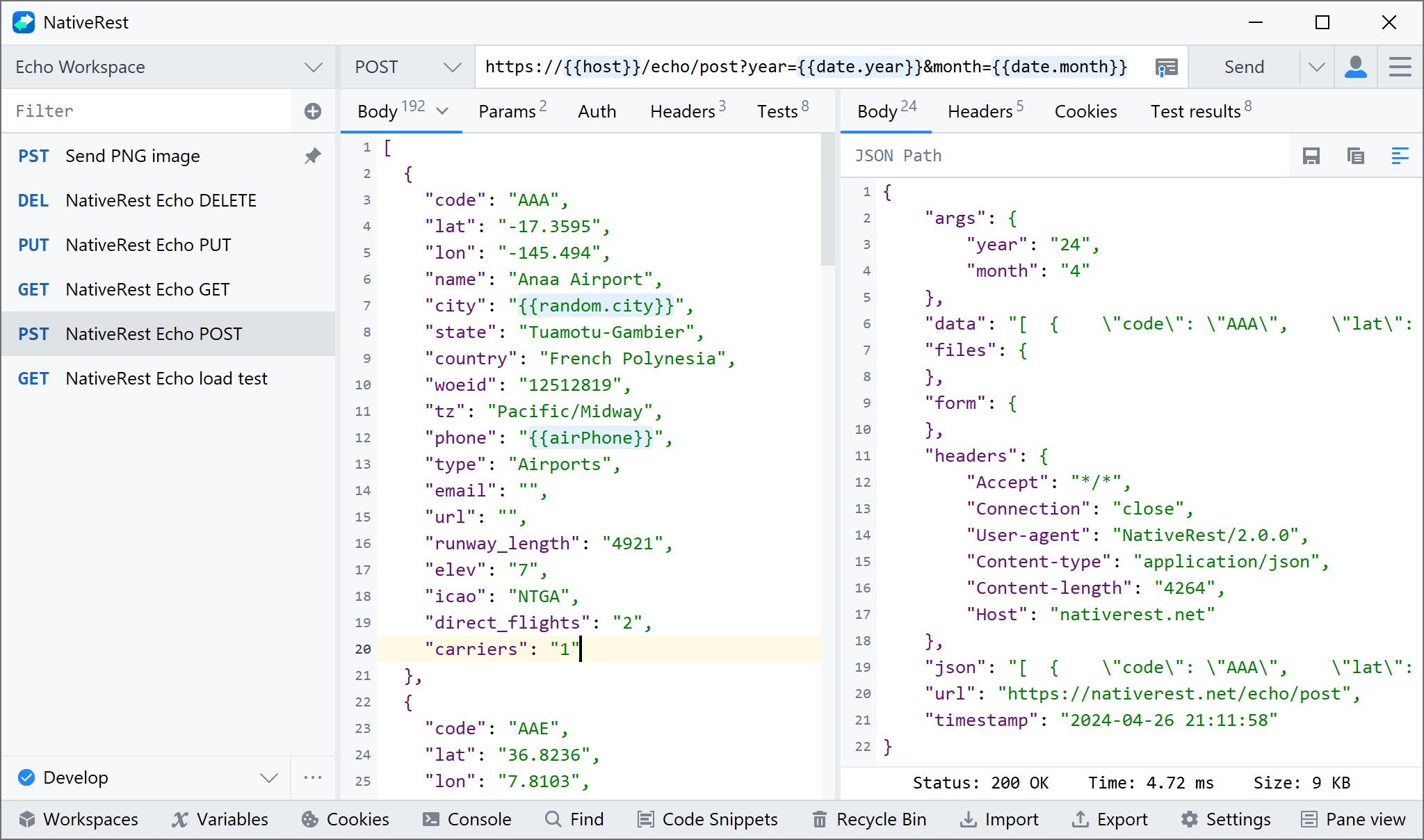
You can send path and query parameters with your requests using the URL field and the Params tab. To send a query parameter, add it directly to the URL or open Params and enter the name and value.
[คุณสามารถส่งพารามิเตอร์พาธและคิวรีด้วยคำขอของคุณโดยใช้ฟิลด์ URL และแท็บ Params ในการส่งพารามิเตอร์แบบสอบถามเพิ่มโดยตรงไปยัง URL หรือเปิดพารามิเตอร์และป้อนชื่อและค่า]
When you enter your query parameters in either the URL or the Params fields, these values will update everywhere they're used in NativeRest.
[เมื่อคุณป้อนพารามิเตอร์การสืบค้นของคุณในฟิลด์ URL หรือฟิลด์พารามิเตอร์ค่าเหล่านี้จะอัปเดตทุกที่ที่ใช้ใน Nativerest]
If your request doesn't require body data, auth, or headers, select Send. Otherwise, set up your body, auth, and headers.
[หากคำขอของคุณไม่ต้องการข้อมูล body การรับรองความถูกต้องหรือส่วนหัวให้เลือกส่ง มิฉะนั้นตั้งค่า body ของคุณรับรองความถูกต้องและส่วนหัว]
Sending body data
You will need to send body data with requests whenever you need to add or update structured data. For example, if you're sending a request to add a new customer to a database, you might include the customer details in JSON. Typically, you will use body data with POST, PUT and PATCH requests. In NativeRest you can also send GET request with body.
[คุณจะต้องส่งข้อมูล body พร้อมคำขอเมื่อใดก็ตามที่คุณต้องการเพิ่มหรืออัปเดตข้อมูลที่มีโครงสร้าง ตัวอย่างเช่นหากคุณกำลังส่งคำขอเพิ่มลูกค้าใหม่ลงในฐานข้อมูลคุณอาจรวมรายละเอียดของลูกค้าใน JSON โดยทั่วไปคุณจะใช้ข้อมูล body กับการโพสต์ใส่และคำขอแพทช์ ใน Nativerest คุณยังสามารถส่งคำขอได้กับ body]
The Body tab in NativeRest enables you to specify the data you need to send with a request. You can send various different types of body data to suit your API.
[แท็บ bodyใน Nativerest ช่วยให้คุณสามารถระบุข้อมูลที่คุณต้องการส่งด้วยคำขอ คุณสามารถส่งข้อมูล body หลากหลายประเภทเพื่อให้เหมาะกับ API ของคุณ]
Raw data
You can use raw body data to send anything you can enter as text. Use the raw tab, and the type dropdown list to indicate the format of your data (Text, JavaScript, JSON, HTML, or XML) and NativeRest will enable syntax-highlighting and appending the relevant headers to your request.
[คุณสามารถใช้ข้อมูล body ดิบเพื่อส่งสิ่งที่คุณสามารถป้อนเป็นข้อความได้ ใช้แท็บ RAW และรายการแบบเลื่อนลงประเภทเพื่อระบุรูปแบบของข้อมูลของคุณ (ข้อความ, JavaScript, JSON, HTML หรือ XML) และ Nativerest จะเปิดใช้งานการส่องสว่างแบบไวยากรณ์และต่อท้ายส่วนหัวที่เกี่ยวข้องกับคำขอของคุณ]
You can set a content type header manually if you need to override the one NativeRest sends automatically. You can use variables in your body data and NativeRest will populate their current values when sending your request.
[คุณสามารถตั้งค่าส่วนหัวประเภทเนื้อหาด้วยตนเองหากคุณต้องการแทนที่สิ่งที่ Nativerest ส่งโดยอัตโนมัติ คุณสามารถใช้ตัวแปรในข้อมูล body ของคุณและ Nativerest จะเติมค่าปัจจุบันของพวกเขาเมื่อส่งคำขอของคุณ]
You used NativeRest to send an API request and got a response from the API server. It's okay to take a moment to sit back and reflect on how cool that is!
[คุณใช้ Nativerest เพื่อส่งคำขอ API และได้รับการตอบกลับจากเซิร์ฟเวอร์ API มันโอเคที่จะใช้เวลาสักครู่เพื่อนั่งลงและไตร่ตรองว่ามันเจ๋งแค่ไหน!]